
Mercedes-Benz GLC 2016-2026 Owners Manual / MBUX multimedia system / Mercedes-Benz emergency call system
Mercedes-Benz GLC : MBUX multimedia system / Mercedes-Benz emergency call system
- Information on the Mercedes-Benz emergency call system
- Overview of the Mercedes-Benz emergency call system
- Triggering an automatic Mercedes‑Benzemergency call
- Triggering a manual Mercedes-Benz emergency call
- Data transfer of the Mercedes-Benz emergency call system
 Overview of smartphone integration
With Smartphone Integration, you can use certain
functions on your mobile phone via the multimedia
system display.
Only one mobile phone at a time can be connected
via Smartphone Integration to the multimedia
system...
 Information on the Mercedes-Benz emergency call system
Your vehicle is equipped with the Mercedes-Benz
emergency call system ("eCall"). This feature can
help save lives in the event of an accident. eCall
in no way replaces assistance provided from
dialing 911...
Other information:
Mercedes-Benz GLC 2016-2026 Owners Manual: HANDS-FREE ACCESS function
With HANDS-FREE ACCESS you can open, close or stop the closing process of the tailgate by performing a kicking movement under the rear bumper. The kicking movement triggers the opening or closing process alternately. Observe the notes when opening and closing the tailgate...
Mercedes-Benz GLC 2016-2026 Owners Manual: ATA (anti-theft alarm system)
Function of the ATA system If the ATA system is armed, a visual and audible alarm is triggered in the following situations: When a door is opened When the tailgate is opened When the hood is opened When the interior motion sensor is triggered When the tow-away alarm is triggered The ATA system is armed automatically after approximately ten seconds in the following situations: After locking the vehicle with the SmartKey After locking the vehicle using KEYLESS-GO Indicator lamp flashes when the ATA system is armed...
Categories
- Manuals Home
- Mercedes-Benz GLC Owners Manual
- Mercedes-Benz GLC Service Manual
- DSR (Downhill Speed Regulation)
- Raising the vehicle when changing a wheel
- Replacing the rear window wiper blade
- New on site
- Most important about car
Activating or deactivating the child safety lock for the rear side windows
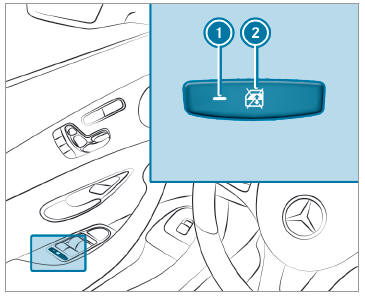
 To activate/deactivate: press button
 . The rear side window can be opened or closed in the following cases:
 is lit: via the switch on the driver's door
Indicator lamp
is lit: via the switch on the driver's door
Indicator lamp  is off: via the switch on the corresponding rear door or driver's door

Copyright © 2026 www.meglc.net