
Mercedes-Benz GLC : AIR BODY CONTROL / Lowering the rear of the vehicle
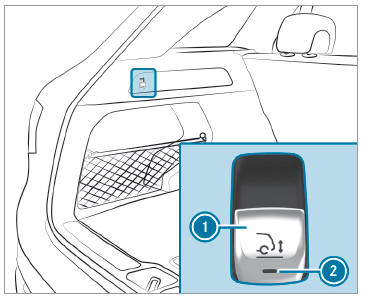
 Apply the electric parking
brake.
Apply the electric parking
brake.
 Shift the transmission to
position
Shift the transmission to
position  .
.
 Pull switch
 in the cargo compartment
trim briefly.
in the cargo compartment
trim briefly.
Indicator lamp
flashes until the vehicle has been lowered.
Lowering is interrupted in the following situations:
- a vehicle door is opened.
- switch
 is pulled again.
 - the vehicle is being driven faster than 1.2 mph (2 km/h).
The vehicle is automatically set to the level of the most recently active drive program if you drive at speeds greater than 1.2 mph (2 km/h) with the rear of the vehicle lowered. The Vehicle Rising Please Wait message appears in the multifunction display.
If indicator lamp  flashes twice
and the rear of
the vehicle does not lower:
flashes twice
and the rear of
the vehicle does not lower:
 Make sure that the requirements
are met.
Make sure that the requirements
are met.
Lowering the rear of the vehicle allows the vehicle to be loaded more easily. Observe the notes on loading the vehicle when doing this.
 Lowering and raising the rear of the vehicle
WARNING Risk of entrapment from vehicle
lowering
When lowering the vehicle, people could
become trapped if their limbs are between
the vehicle body and the tires or underneath
the vehicle...
 Raising the rear of the vehicle
Check if the battery is
sufficiently charged. If
necessary, start the engine.
Pull switch 1 briefly.
Indicator lamp 2 goes out.
The vehicle will be raised to the currently
selected level...
Other information:
Mercedes-Benz GLC 2016-2026 Owners Manual: Function of the ASSYST PLUS service interval display
The ASSYST PLUS service interval display on the Instrument Display provides information on the remaining time or distance before the next service due date. You can hide this service display using the back button on the left-hand side of the steering wheel...
Mercedes-Benz GLC 2016-2026 Owners Manual: Arming/deactivating the interior motion sensor
Multimedia system: Settings Quick Access Activate or deactivate Interior Motion Sensor. The interior motion sensor is activated again in the following cases: The vehicle is unlocked again. A door is opened. The vehicle is locked again. If quick access is unavailable, select the Vehicle menu under Settings to activate or deactivate the interior motion sensor...
Categories
- Manuals Home
- Mercedes-Benz GLC Owners Manual
- Mercedes-Benz GLC Service Manual
- Opening and closing the sliding sunroof
- Information on collision detection on a parked vehicle
- Function of the interior motion sensor
- New on site
- Most important about car
Overview of airbags
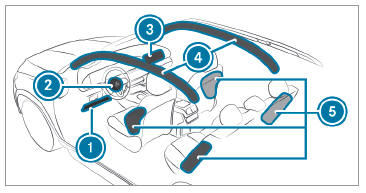
 Driver's knee airbag
 Driver's airbag
