
Mercedes-Benz GLC : Mercedes-Benz emergency call system / Overview of the Mercedes-Benz emergency call system
eCall can help to reduce the time between an accident and the arrival of emergency services at the site of the accident. It helps locate an accident site in places that are difficult to access. However, even if a vehicle is equipped with eCall, this does not mean the system is ON. As such, eCall does not replace dialing 911 in the event of an accident.
An emergency call can be made automatically or manually Only make emergency calls if you or others are in need of rescue.
Only make emergency calls if you or others are in need of rescue. Do not make an emergency call in the event of a breakdown or a similar situation.
Messages on the display
SOS NOT READY: the ignition is not on or eCall not available.
During an active emergency call,  appears
in the display.
appears
in the display.
You can find more information on the regional availability of eCall at: https://www.mercedesbenz-mobile.com/extra/ecall/
If there is a malfunction in the Mercedes- Benz emergency call system (e.g. a fault with the speaker, microphone, airbag, SOS button), a corresponding message appears in the multifunction display of the instrument cluster.
 Information on the Mercedes-Benz emergency call system
Your vehicle is equipped with the Mercedes-Benz
emergency call system ("eCall"). This feature can
help save lives in the event of an accident. eCall
in no way replaces assistance provided from
dialing 911...
 Triggering an automatic Mercedes‑Benzemergency call
Requirements:
The ignition is switched on.
The starter battery is sufficiently charged.
The Mercedes‑Benz emergency call system triggers
an emergency call automatically in the following
cases:
After activation of the restraint systems such
as airbags or Emergency Tensioning Devices
after an accident
After an automatically initiated emergency
stop by Active Emergency Stop Assist
The emergency call has been made:
A voice connection is made to the
Mercedes‑Benz emergency call center...
Other information:
Mercedes-Benz GLC 2016-2026 Owners Manual: Storing the parking position of the front passenger outside mirror using reverse gear
Storing Select the front-passenger outside mirror using button . Engage reverse gear. Move the front-passenger outside mirror into the desired parking position using button . Calling up Select the front-passenger outside mirror using button ...
Mercedes-Benz GLC 2016-2026 Owners Manual: Active Distance Assist DISTRONIC
Function of Active Distance Assist DISTRONIC Active Distance Assist DISTRONIC maintains the set speed on free-flowing roads. If vehicles in front are detected, the set distance is maintained, if necessary, until the vehicle comes to a halt. The vehicle accelerates or brakes depending on the distance to the vehicle in front and the set speed...
Categories
- Manuals Home
- Mercedes-Benz GLC Owners Manual
- Mercedes-Benz GLC Service Manual
- Overview of the traffic light data service
- Opening and closing the hood
- Activating or deactivating the child safety lock for the rear doors
- New on site
- Most important about car
Unlocking/opening the doors from the inside
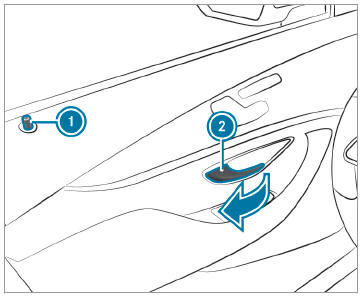
 To unlock and open a front
door: pull door
handle
To unlock and open a front
door: pull door
handle  .
.
