
Mercedes-Benz GLC 2016-2026 Owners Manual / Driving and parking / Driving and driving safety systems / Rear view camera
Mercedes-Benz GLC : Driving and driving safety systems / Rear view camera
 Raising the rear of the vehicle
Check if the battery is
sufficiently charged. If
necessary, start the engine.
Pull switch 1 briefly.
Indicator lamp 2 goes out.
The vehicle will be raised to the currently
selected level...
 Function of the rear view camera
When you engage reverse gear, the image from
the rear view camera is shown in the media display.
Dynamic guide lines show the path the vehicle will take with the current
steering angle...
Other information:
Mercedes-Benz GLC 2016-2026 Owners Manual: Installing a LATCH-type (ISOFIX) child restraint system on the rear seat
Installing a LATCH-type (ISOFIX) child restraint system on the rear seat WARNING Risk of accident if the rear bench seat, rear seat and seat backrest are not engaged The rear bench seat, rear seat and seat backrest may fold forwards, even when you are driving...
Mercedes-Benz GLC 2016-2026 Owners Manual: Summer tires
1 "ZR" stated in the tire code. 2 Or "M+Si" for winter tires. Specifying the speed rating as the "ZR" index in tire code is optional for tires up to 186 mph (300 km/h). If your tire code includes "ZR" and there is no speed rating , find out what the maximum speed is from the tire manufacturer...
Categories
- Manuals Home
- Mercedes-Benz GLC Owners Manual
- Mercedes-Benz GLC Service Manual
- Function of the interior motion sensor
- Overview of the traffic light data service
- Activating or deactivating the child safety lock for the rear doors
- New on site
- Most important about car
Removing/inserting the emergency key
Removing the emergency key
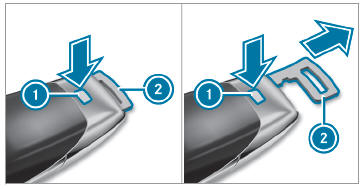
 Press release knob
 . Emergency key 2 is pushed out slightly.

Copyright © 2026 www.meglc.net