
Mercedes-Benz GLC 2016-2026 Owners Manual / Light and visibility / Exterior lighting / Operating the combination switch for the lights
Mercedes-Benz GLC : Exterior lighting / Operating the combination switch for the lights
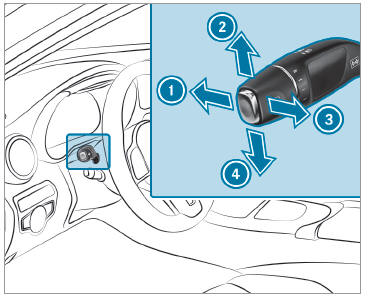
 High beam
 Turn signal light, right
 High-beam flasher
 Turn signal light, left
 Use the combination switch to
activate the
desired function.
Use the combination switch to
activate the
desired function.
Switching on high beam
 Turn the light switch to the
 or
or
 position.
 Push the combination switch
beyond the
point of resistance in the direction of arrow
Push the combination switch
beyond the
point of resistance in the direction of arrow
 .
.
When the high beam is activated, the
indicator lamp for low beam will be deactivated and replaced by the
indicator lamp for high beam.
- Switching off high beam. High-beam flasher. Turn signal light
- Activating/deactivating the hazard warning lights
- Cornering light
- Adaptive Highbeam Assist
 Light switch
Operating light switches
Left-hand standing lamps
Right-hand standing lamps
Parking lamps and license plate
lamp
Automatic driving lights (preferred
light
switch position)
Low beam/high beam
Switches the rear fog lamp on or
off
When low beam is activated, the
indicator
lamp for the parking lamps will be deactivated
and replaced by the low-beam
indicator
lamp...
 Switching off high beam. High-beam flasher. Turn signal light
Switching off high beam
Move the combination switch back
to its
starting position.
High-beam flasher
Pull the combination switch in
the direction
of arrow ...
Other information:
Mercedes-Benz GLC 2016-2026 Owners Manual: Emergencies and breakdowns
..
Mercedes-Benz GLC 2016-2026 Owners Manual: Activating or deactivating the child safety lock for the rear doors
WARNING Risk of accident and injury due to children left unattended in the vehicle If children are left unsupervised in the vehicle, they could, in particular: open doors, thereby endangering other persons or road users. get out and be struck by oncoming traffic...
Categories
- Manuals Home
- Mercedes-Benz GLC Owners Manual
- Mercedes-Benz GLC Service Manual
- Opening the camera cover of the rear view camera
- Function of the interior motion sensor
- Overview of buttons on the steering wheel
- New on site
- Most important about car
Unlocking/opening the doors from the inside
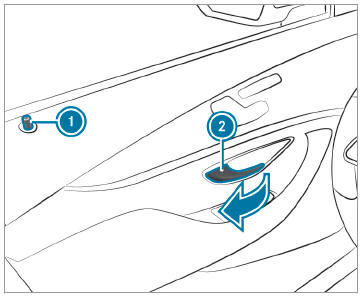
 To unlock and open a front
door: pull door
handle
To unlock and open a front
door: pull door
handle  .
.

Copyright © 2026 www.meglc.net