
Mercedes-Benz GLC 2016-2026 Owners Manual / Opening and closing / SmartKey / Removing/inserting the emergency key
Mercedes-Benz GLC : SmartKey / Removing/inserting the emergency key
Removing the emergency key
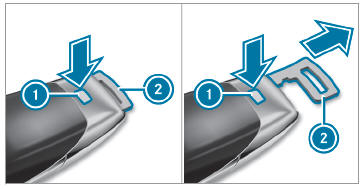
 Press release knob
 . Emergency key 2 is pushed out slightly.
 Pull out emergency key
 until it engages in the intermediate position.
 Press release knob
 again and fully remove emergency key
 .
.
Inserting the emergency key
- Press release knob
 .
. - Insert emergency key
 to the intermediate
position or fully until it engages.
to the intermediate
position or fully until it engages.
You can use the intermediate position of
emergency key  to attach the SmartKey to
a key ring.
to attach the SmartKey to
a key ring.
 Deactivating the SmartKey functions
If you do not use the vehicle or a SmartKey for
an extended period of time, you can reduce the
energy consumption of the respective SmartKey.
To do so, deactivate the SmartKey functions...
 Replacing the SmartKey battery
DANGER Serious damage to health
caused by swallowing batteries
Batteries contain toxic and corrosive substances.
Swallowing batteries may cause
serious damage to health...
Other information:
Mercedes-Benz GLC 2016-2026 Owners Manual: Notes on wirelessly charging the mobile phone
WARNING Risk of injury due to objects being stowed incorrectly If objects in the vehicle interior are stowed incorrectly, they can slide or be thrown around and hit vehicle occupants. In addition, cup holders, open stowage spaces and mobile phone receptacles cannot always retain all objects within...
Mercedes-Benz GLC 2016-2026 Owners Manual: Function of EBD. Function of STEER CONTROL
Function of EBD Electronic Breakforce Distribution (EBD) is characterized by the following: Monitoring and regulating the brake pressure on the rear wheels. Improved driving stability when braking, especially on bends. Function of STEER CONTROL STEER CONTROL helps you by transmitting a noticeable steering force to the steering wheel in the direction required for vehicle stabilization...
Categories
- Manuals Home
- Mercedes-Benz GLC Owners Manual
- Mercedes-Benz GLC Service Manual
- Information on collision detection on a parked vehicle
- Opening and closing the hood
- Using the 12 V socket
- New on site
- Most important about car
HANDS-FREE ACCESS function
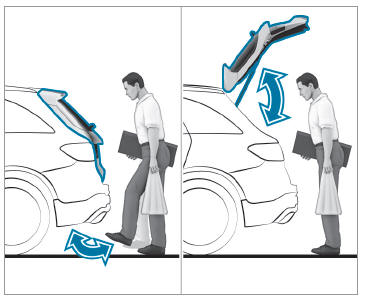
With HANDS-FREE ACCESS you can open, close or stop the closing process of the tailgate by performing a kicking movement under the rear bumper.
The kicking movement triggers the opening or closing process alternately.
Observe the notes when opening and closing the tailgate.

Copyright © 2026 www.meglc.net