
Mercedes-Benz GLC 2016-2026 Owners Manual / Driving and parking / Driving and driving safety systems / Parking Assist PARKTRONIC / Problems with Parking Assist PARKTRONIC
Mercedes-Benz GLC : Parking Assist PARKTRONIC / Problems with Parking Assist PARKTRONIC
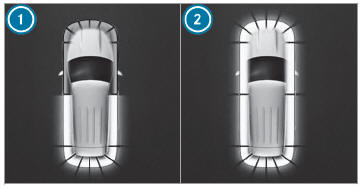
Example: vehicles with surround view camera
When rear segments  or all-round
segments
or all-round
segments
 light up red and the
 symbol appears in
the multifunction display, Parking Assist
PARKTRONIC may have been deactivated due to
signal interference. Start the vehicle again and
check if Parking Assist PARKTRONIC is working
at a different location.
symbol appears in
the multifunction display, Parking Assist
PARKTRONIC may have been deactivated due to
signal interference. Start the vehicle again and
check if Parking Assist PARKTRONIC is working
at a different location.
If a warning tone also sounds for approximately two seconds every time the vehicle is started, it may be due to one of the following causes:
- The sensors are dirty: clean the sensors and observe the notes on care of vehicle parts.
- Parking Assist PARKTRONIC has been deactivated due to a malfunction: restart the vehicle. If the problem persists, consult a qualified specialist workshop.
 System limits
Parking Assist PARKTRONIC does not necessarily
take into account the following obstacles:
Obstacles below the detection range, e.g.
persons, animals or objects...
 Function of the passive side impact protection
Passive side impact protection is an additional
Parking Assist PARKTRONIC function which
warns the driver about obstacles at the side of
the vehicle...
Other information:
Mercedes-Benz GLC 2016-2026 Owners Manual: PRE-SAFE® (anticipatory occupant protection)
PRE-SAFE® is able to detect certain critical driving situations and implement pre-emptive measures to protect the vehicle occupants. PRE-SAFE® can implement the following measures independently of each other: Tightening the seat belts on the driver's seat and front passenger seat...
Mercedes-Benz GLC 2016-2026 Owners Manual: Replacing the 12 V battery
Observe the notes on the 12 V battery. Mercedes-Benz recommends that you have the 12 V battery replaced at a qualified specialist workshop, e.g. at an authorized Mercedes-Benz Center. Observe the following notes if you want to replace the battery yourself: Always replace a faulty battery with a battery which meets the specific vehicle requirements...
Categories
- Manuals Home
- Mercedes-Benz GLC Owners Manual
- Mercedes-Benz GLC Service Manual
- Opening and closing the sliding sunroof
- Removing the cargo compartment cover
- Information on collision detection on a parked vehicle
- New on site
- Most important about car
Removing/inserting the emergency key
Removing the emergency key
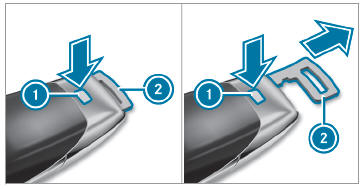
 Press release knob
 . Emergency key 2 is pushed out slightly.

Copyright © 2026 www.meglc.net