
Mercedes-Benz GLC : Parking Assist PARKTRONIC / System limits
Parking Assist PARKTRONIC does not necessarily take into account the following obstacles:
- Obstacles below the detection range, e.g. persons, animals or objects.
- Obstacles above the detection range, e.g. overhanging loads, overhangs or loading ramps of trucks.
The sensors must be free of dirt, ice and slush. Otherwise, they may not function correctly. Clean the sensors regularly, especially after driving off-road, taking care not to scratch or damage them.
Vehicles with trailer hitch: Parking Assist PARKTRONIC is deactivated for the rear zone when you establish an electrical connection between your vehicle and a trailer.
 Parking Assist PARKTRONIC display in the multimedia system
Vehicles without surround view camera
Vehicles with surround view camera
If you have not selected the Camera & Parking
menu and an obstacle is detected in the path of
the vehicle, a pop-up window for Parking Assist
PARKTRONIC appears in the
multimedia system
at speeds below 6 mph (10 km/h)...
 Problems with Parking Assist PARKTRONIC
Example: vehicles with surround view camera
When rear segments or all-round
segments
light up red and the
symbol appears in
the multifunction display, Parking Assist
PARKTRONIC may have been deactivated due to
signal interference...
Other information:
Mercedes-Benz GLC 2016-2026 Owners Manual: Function of PRE-SAFE® PLUS (anticipatory occupant protection plus)
PRE-SAFE® (anticipatory occupant protection) PRE-SAFE® is able to detect certain critical driving situations and implement pre-emptive measures to protect the vehicle occupants. PRE-SAFE® can implement the following measures independently of each other: Tightening the seat belts on the driver's seat and front passenger seat...
Mercedes-Benz GLC 2016-2026 Owners Manual: Switching the daytime running lamps on/off. Setting the exterior lighting switch-off delay time
Switching the daytime running lamps on/off. Multimedia system: Settings Light Daytime Run. Lights Switch the function on or off. Setting the exterior lighting switch-off delay time Requirements: The light switch is in the position. Multimedia system: Settings Light Exterior Lighting Delay Set the switch-off delay time...
Categories
- Manuals Home
- Mercedes-Benz GLC Owners Manual
- Mercedes-Benz GLC Service Manual
- Digital Operator's Manual
- Overview of buttons on the steering wheel
- Opening and closing the hood
- New on site
- Most important about car
HANDS-FREE ACCESS function
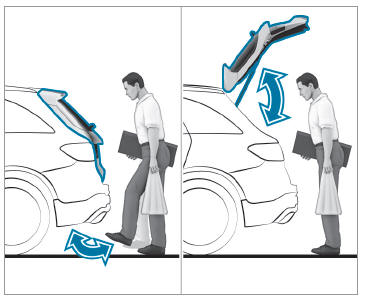
With HANDS-FREE ACCESS you can open, close or stop the closing process of the tailgate by performing a kicking movement under the rear bumper.
The kicking movement triggers the opening or closing process alternately.
Observe the notes when opening and closing the tailgate.

Copyright © 2026 www.meglc.net