
Mercedes-Benz GLC 2016-2026 Owners Manual / Light and visibility / Windshield wiper and windshield washer system / Replacing the windshield wiper blades / Installing the wiper blades
Mercedes-Benz GLC : Replacing the windshield wiper blades / Installing the wiper blades
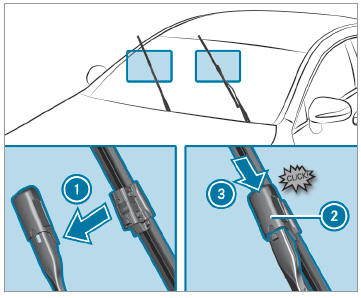
 Insert the new wiper blade into
the wiper
arm in the direction of arrow
Insert the new wiper blade into
the wiper
arm in the direction of arrow  .
.
 Slide catch
 in the direction of arrow
 until it engages in the locking position.
 Make sure that the wiper blade
is seated correctly.
Make sure that the wiper blade
is seated correctly.
 Fold the wiper arms back onto
the wind‐
shield.
Fold the wiper arms back onto
the wind‐
shield.
 Switch on the ignition.
 Press the
 button on the combination
switch.
button on the combination
switch.
The wiper arms will return to the original position.
 Switch the ignition off.
 Removing the wiper blades
Fold the wiper arms away from
the windshield.
Hold the wiper arm with one
hand. With the
other hand, turn the wiper blade away from
the wiper arm in the direction of arrow
as
far as it will go...
 Maintenance display
Remove protective film
from the mainte‐
nance display on the tip of the newly instal‐
led wiper blades.
When the color of the maintenance display
changes from black to yellow, the wiper blades
should be replaced...
Other information:
Mercedes-Benz GLC 2016-2026 Owners Manual: Overhead control panel
..
Mercedes-Benz GLC 2016-2026 Owners Manual: Climate style
Climate style function The following climate styles are available in automatic mode: FOCUS: high airflow, slightly cooler setting MEDIUM: medium airflow, standard setting DIFFUSE: low airflow, slightly warmer and draft-free setting Adjusting the climate mode settings Call up the air conditioning menu Select First Row of Seats or Second Row of Seats...
Categories
- Manuals Home
- Mercedes-Benz GLC Owners Manual
- Mercedes-Benz GLC Service Manual
- Overview of the traffic light data service
- Raising the vehicle when changing a wheel
- Overview of airbags
- New on site
- Most important about car
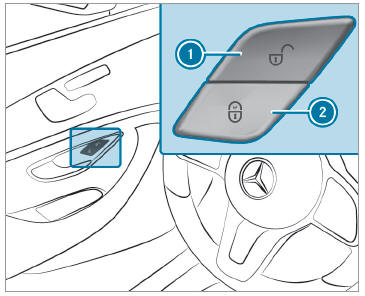
Activating/deactivating the automatic locking feature
The vehicle is locked automatically when the ignition is switched on and the wheels are turning faster than walking pace.

Copyright © 2026 www.meglc.net