
Mercedes-Benz GLC 2016-2026 Owners Manual / Driving and parking / Driving / Notes on off-road driving / Checklist after driving off-road
Mercedes-Benz GLC : Notes on off-road driving / Checklist after driving off-road
Driving off-road places greater demands on your vehicle than driving on normal roads. Check the entire vehicle for damage and foreign bodies every time after driving off-road. Foreign bodies in the wheels or drivetrain can lead to imbalances and therefore vibrations.
- If the
 or
or
 drive program is selected:
select another drive program.
drive program is selected:
select another drive program. - Deactivate DSR.
- Lower the vehicle level again to a level suitable to the road conditions, e.g. to the normal level.
- Apply the brakes to dry them after fording.
- Check that the service brake is working normally after a long downhill stretch.
- Clean the following components every time
after driving off-road:
- License plate number
- Headlamps and tail lamps
- Tires, wheels and wheel arches
- Underbody
- After driving through sand, mud, water or
gravel, have the following components
checked and cleaned:
- Brake discs and brakepads
- Tires and wheels
- Axle joints
 Driving in mountainous terrain
Also observe the following information when
driving in mountainous terrain:
Observe the values of the approach/departure
angle and of the maximum gradient...
 ECO start/stop function
Operation of the ECO start/stop function
The ECO start/stop function is not available
in all drive programs, depending on the
engine. Observe the status display in the
multifunction display for this...
Other information:
Mercedes-Benz GLC 2016-2026 Owners Manual: Adjusting the 4-way lumbar support
..
Mercedes-Benz GLC 2016-2026 Owners Manual: Summer tires
1 "ZR" stated in the tire code. 2 Or "M+Si" for winter tires. Specifying the speed rating as the "ZR" index in tire code is optional for tires up to 186 mph (300 km/h). If your tire code includes "ZR" and there is no speed rating , find out what the maximum speed is from the tire manufacturer...
Categories
- Manuals Home
- Mercedes-Benz GLC Owners Manual
- Mercedes-Benz GLC Service Manual
- Folding the rear seat backrest forwards
- Overview of airbags
- Opening and closing the sliding sunroof
- New on site
- Most important about car
Activating or deactivating the child safety lock for the rear side windows
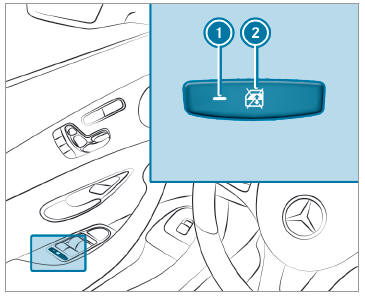
 To activate/deactivate: press button
 . The rear side window can be opened or closed in the following cases:
 is lit: via the switch on the driver's door
Indicator lamp
is lit: via the switch on the driver's door
Indicator lamp  is off: via the switch on the corresponding rear door or driver's door

Copyright © 2026 www.meglc.net