
Mercedes-Benz GLC 2016-2026 Owners Manual / General notes / Data storage / Online services / Third party services
Mercedes-Benz GLC : Online services / Third party services
If you use online services from other providers (third parties), these services are the responsibility of the provider in question and subject to that provider's data protection conditions and terms of use. As a general rule, the manufacturer has no influence on the content exchanged.
For this reason, when services are provided by third parties, please ask the service provider in question for information about the type, extent and purpose of the collection and use of personal data.
 Manufacturer's services
Regarding the manufacturer's online services,
the individual functions are described by the
manufacturer in a suitable place, for example, in
the Operator's Manual or on the manufacturer's
website, where the relevant data protection
information is also given...
 Data protection rights
Depending on your country or the equipment
and range of functions of your vehicle as well as
the services you use and the services on offer,
you are entitled to different data protection
rights...
Other information:
Mercedes-Benz GLC 2016-2026 Owners Manual: Using map functions
Multimedia system: Navigation Setting the map scale To zoom in: tap twice quickly with one finger on the media display. To zoom out: tap with two fingers on the media display. Moving the map Move one finger in any direction on the touchscreen...
Mercedes-Benz GLC 2016-2026 Owners Manual: Removing the cargo compartment cover
..
Categories
- Manuals Home
- Mercedes-Benz GLC Owners Manual
- Mercedes-Benz GLC Service Manual
- Folding the rear seat backrest forwards
- DSR (Downhill Speed Regulation)
- Using the 12 V socket
- New on site
- Most important about car
Removing/inserting the emergency key
Removing the emergency key
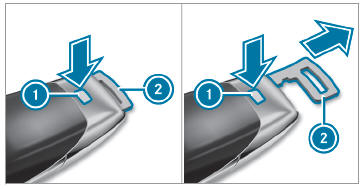
 Press release knob
 . Emergency key 2 is pushed out slightly.

Copyright © 2026 www.meglc.net