
Mercedes-Benz GLC 2016-2026 Owners Manual / MBUX multimedia system / Overview and operation / Operating the MBUX multimedia system
Mercedes-Benz GLC : Overview and operation / Operating the MBUX multimedia system
 Home screen overview
Depending on the display, calls
up the first
three applications or the home screen
Calls up the profile
Calls up the global search
SOS NOT READY (only when the
Mercedes-
Benz emergency call system is not available)
Mercedes me connect active
Transmission of vehicle
position active
Signal strength of the mobile
phone network,
network display, battery status of the mobile
phone connected, time
Calls up the Notifications
Center
Calls up an application using
the symbol
Application and current
information
Quick-access, e...
 Using Touch Control
Calls up the home screen
Touch Control
Pressing briefly: returns to the
previous
display
Navigation through the menus is carried out with
Touch Control with single-finger
swipes...
Other information:
Mercedes-Benz GLC 2016-2026 Owners Manual: Electronic control units
Electronic control units are installed in your vehicle. Control units process data which, for example, they receive from vehicle sensors, generate themselves or exchange between themselves. Some control units are required for the safe operation of your vehicle, some assist you when driving, such as driver assistance systems, while others enable comfort or infotainment functions...
Mercedes-Benz GLC 2016-2026 Owners Manual: Coolant
Notes on coolant Observe the notes on operating fluids. WARNING ‑ Risk of fire and injury from antifreeze If antifreeze comes into contact with hot component parts in the engine compartment, it may ignite. Allow the engine to cool down before adding antifreeze...
Categories
- Manuals Home
- Mercedes-Benz GLC Owners Manual
- Mercedes-Benz GLC Service Manual
- Digital Operator's Manual
- Overview of airbags
- AIR BODY CONTROL function
- New on site
- Most important about car
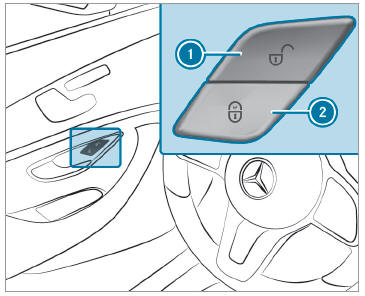
Activating/deactivating the automatic locking feature
The vehicle is locked automatically when the ignition is switched on and the wheels are turning faster than walking pace.

Copyright © 2026 www.meglc.net