
Mercedes-Benz GLC 2016-2026 Owners Manual / Driving and parking / Driving and driving safety systems / Increasing or decreasing the speed
Mercedes-Benz GLC : Driving and driving safety systems / Increasing or decreasing the speed

 mph (1 km/h): press rocker switch
 up
up
 or down
 to the pressure point.
or
 5 mph (10 km/h): press
rocker switch
5 mph (10 km/h): press
rocker switch  up
up
 or down
 beyond the pressure
point.
beyond the pressure
point.
or
 Accelerate the vehicle
to the desired speed
and press rocker switch
Accelerate the vehicle
to the desired speed
and press rocker switch  up
up
 .
.
Changing the specified distance to the vehicle in front
 To reduce the
specified distance: press
the right rocker switch up (
To reduce the
specified distance: press
the right rocker switch up ( ).
).
 To increase the
specified distance: press
the right rocker switch down (
To increase the
specified distance: press
the right rocker switch down ( ).
).
 Pulling away with Active Distance Assist DISTRONIC
Activate Active Distance Assist DISTRONIC
and remove your foot from the brake pedal.
Select
with the left rocker switch.
or
Depress the accelerator
pedal briefly and
firmly...
 Function of Active Speed Limit Assist
If speed limit change between 12 mph
(20 km/h) and 80 mph (130 km/h) is detected and the automatic adoption of speed
limits is
active, it will be automatically adopted as the
stored speed...
Other information:
Mercedes-Benz GLC 2016-2026 Owners Manual: Using kickdown. Glide mode function
Using kickdown Maximum acceleration: depress the accelerator pedal beyond the pressure point. To protect against engine overrev, the automatic transmission shifts up to the next gear when maximum engine speed has been reached. Glide mode function NOTE Mercedes-AMG vehicles Observe the notes in the Supplement...
Mercedes-Benz GLC 2016-2026 Owners Manual: Notes in the event of a flat tire
WARNING Risk of accident due to a flat tire A flat tire severely affects the driving characteristics as well as the steering and braking of the vehicle. Tires without run-flat characteristics: Do not drive with a flat tire. Change the flat tire immediately with an emergency spare wheel or spare wheel...
Categories
- Manuals Home
- Mercedes-Benz GLC Owners Manual
- Mercedes-Benz GLC Service Manual
- AIR BODY CONTROL function
- ATA (anti-theft alarm system)
- Overview of the traffic light data service
- New on site
- Most important about car
Unlocking/opening the doors from the inside
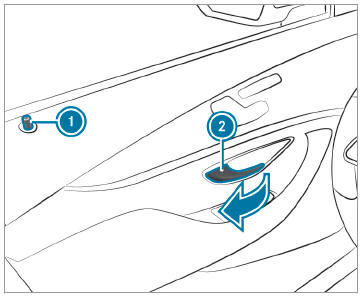
 To unlock and open a front
door: pull door
handle
To unlock and open a front
door: pull door
handle  .
.

Copyright © 2026 www.meglc.net