
Mercedes-Benz GLC : Notes on off-road driving / ECO display function
The ECO display summarizes your driving characteristics from the start of the journey to its completion and assists you in achieving the most economical driving style.
You can influence consumption by doing the following:
- Driving with particular care
- Driving the vehicle in drive program

- Observing the gearshift recommendations
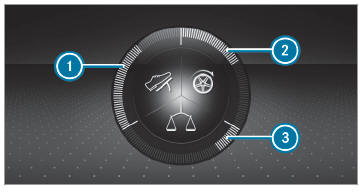
The inner segment will light up and the outer segment will fill up when the following driving style is adopted:
 Moderate acceleration
 Gentle deceleration and
rolling
Gentle deceleration and
rolling Consistent speed
The inner segment will not light up and the outer segment will empty when the following driving style is adopted:
 Sporty acceleration
 Heavy braking
 Fluctuations in speed
The ECO display will show you when you have driven economically:
- The three outer segments are completely filled simultaneously.
- The ECO display lights up.
The additional range achieved as a result of your driving style in comparison with a driver with a very sporty driving style is shown under Bonus fr. Start. The range displayed does not indicate a fixed reduction in consumption.
 Deactivating or activating the ECO start/stop function
Press button
.
If indicator lamp lights
up, the ECO start/
stop function is activated.
Depending on the model and the vehicle
equipment, the button may also be located
at a different position in the center console...

Other information:
Mercedes-Benz GLC 2016-2026 Owners Manual: Sport Utility Vehicle
WARNING Risk of accident when the center of gravity is too high The vehicle may start to skid and rollover in the event of sudden steering maneuvers and/or when the vehicle's speed is not adapted to the road conditions. Always adapt your speed and driving style to the vehicle's driving characteristics and to the prevailing road and weather conditions...
Mercedes-Benz GLC 2016-2026 Owners Manual: Coupling/uncoupling a trailer
WARNING Risk of injury from the vehicle level being changed Vehicles with level control system: the vehicle level may be changed unintentionally, e.g. by other persons. You may become trapped if you couple up or uncouple a trailer while the vehicle level is changing...
Categories
- Manuals Home
- Mercedes-Benz GLC Owners Manual
- Mercedes-Benz GLC Service Manual
- Removing the cargo compartment cover
- Opening and closing the hood
- Digital Operator's Manual
- New on site
- Most important about car
Overview of airbags
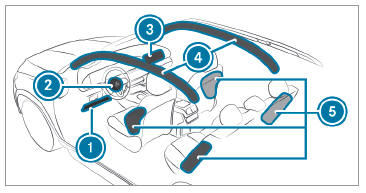
 Driver's knee airbag
 Driver's airbag
