
Mercedes-Benz GLC : 360° camera / System limits
The surround view camera will not function or will only partially function in the following situations:
- The doors are open.
- The outside mirrors are folded in.
- The tailgate is open.
- There is heavy rain, snow or fog.
- The ambient light conditions are poor, e.g. at night.
- Cameras, or vehicle components in which the cameras are installed, are damaged, dirty or covered. Observe the information on vehicle sensors and cameras.
Do not use the surround view camera under such circumstances. You could otherwise injure others or collide with objects when parking the vehicle.
For technical reasons, the standard height of the vehicle may be altered if the vehicle is carrying a heavy load and can result in inaccuracies in the guide lines and in the display of the generated images.
The contrast of the display may be impaired by abrupt, direct sunlight or by other light sources, e.g. when driving out of a garage. In this case, pay particular attention.
Have the display repaired or replaced if, for example, pixel errors considerably restrict its use.
See the notes on cleaning the surround view camera.
 System failure
I..
 Calling up the view of the surround view camera using reverse gear
Shift to reverse gear.
Select the desired view in the
multimedia
system.
If, after shifting to reverse
gear, the image of
the rear view camera is not shown: switch off
the ignition, press and hold the
button,
switch on the ignition and engage reverse
gear again...
Other information:
Mercedes-Benz GLC 2016-2026 Owners Manual: Opening and closing the fuse box in the front passenger footwell
O..
Mercedes-Benz GLC 2016-2026 Owners Manual: Electric parking brake
Function of the electric parking brake (applying automatically) WARNING Risk of accident and injury due to children left unattended in the vehicle If children are left unsupervised in the vehicle, they could, in particular: open doors, thereby endangering other persons or road users...
Categories
- Manuals Home
- Mercedes-Benz GLC Owners Manual
- Mercedes-Benz GLC Service Manual
- Overview of buttons on the steering wheel
- ATA (anti-theft alarm system)
- Opening the camera cover of the rear view camera
- New on site
- Most important about car
Adjusting the steering wheel electrically
The steering wheel can be adjusted when the power supply is disconnected.
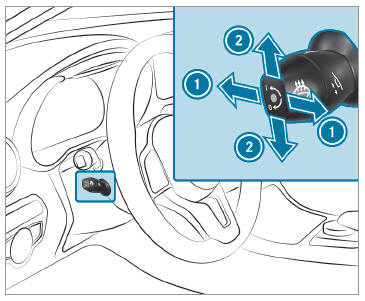
 To adjust the distance to the
steering wheel
To adjust the distance to the
steering wheel
