
Mercedes-Benz GLC : Navigation / Notes on navigation
Route guidance with augmented reality
WARNING Risk of accident and injury as a result of distraction, incorrect depiction or wrong interpretation of the display
The camera image of the augmented reality display is not suitable as a guide for driving.
 Always keep an eye on the
actual traffic
situation.
Always keep an eye on the
actual traffic
situation.
 Avoid extended observation
of the camera
image.
Avoid extended observation
of the camera
image.
WARNING Risk of accident and injury due to imprecise positioning of additional information
The additional information from the augmented reality display is not a substitute for observing the actual driving situation.
 Always keep an eye on the
actual traffic
situation when carrying out all driving
maneuvers.
Always keep an eye on the
actual traffic
situation when carrying out all driving
maneuvers.
 Navigation
..
 Switching navigation on
Multimedia system:
Navigation (Navigation)
Alternatively: press the
button.
The map shows the vehicle's current position.
The navigation menu is shown...
Other information:
Mercedes-Benz GLC 2016-2026 Owners Manual: Changing the unlocking settings
Possible unlocking functions of the SmartKey: Central unlocking Unlocking the driver's door and fuel filler flap To switch between settings: press the and buttons simultaneously for approximately six seconds until the indicator lamp flashes twice...
Mercedes-Benz GLC 2016-2026 Owners Manual: Replacing the windshield wiper blades
WARNING Risk of becoming trapped if the windshield wipers are switched on while wiper blades are being replaced If the windshield wipers begin to move while you are changing the wiper blades, you can be trapped by the wiper arm. Always switch off the windshield wipers and the ignition before changing the wiper blades...
Categories
- Manuals Home
- Mercedes-Benz GLC Owners Manual
- Mercedes-Benz GLC Service Manual
- Opening and closing the hood
- DSR (Downhill Speed Regulation)
- Sound settings
- New on site
- Most important about car
Removing/inserting the emergency key
Removing the emergency key
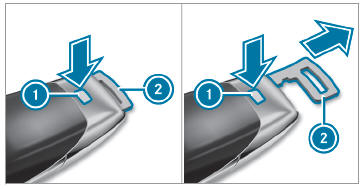
 Press release knob
 . Emergency key 2 is pushed out slightly.
