
Mercedes-Benz GLC : DYNAMIC SELECT switch / Configuring DYNAMIC SELECT (multimedia system)
Multimedia system:


 Settings
 Vehicle
 DYNAMIC SELECT
Setting drive program I
 Select Individual
Configuration.
Select Individual
Configuration.
 Select and set a category.
Switching the restoration display on or off
 Switch Request at
Start on or off.
Switch Request at
Start on or off.
Function on: the next time the vehicle is started a prompt appears asking whether the last active drive program should be restored. If the ECO start/stop function was deactivated, an additional prompt appears asking if the function should remain deactivated.
The prompt appears only if the previously active settings deviate from the standard settings.
Function off: the next time the vehicle is started
the  drive program is set
automatically.
drive program is set
automatically.
The ECO start/stop function is activated automatically.
This function must be activated for each user profile separately. Only when this function is activated will the drive program and Eco start/stop setting for the previous journey be saved for the respective user profile.

 Displaying vehicle data. Displaying engine data
Displaying vehicle data
Multimedia system:
Info
Select Vehicle.
The vehicle data is displayed.
Displaying engine data
Multimedia system:
Info
Select Engine...
Other information:
Mercedes-Benz GLC 2016-2026 Owners Manual: Manufacturer's services
Regarding the manufacturer's online services, the individual functions are described by the manufacturer in a suitable place, for example, in the Operator's Manual or on the manufacturer's website, where the relevant data protection information is also given...
Mercedes-Benz GLC 2016-2026 Owners Manual: TIREFIT kit storage location
Plug-in hybrid: be sure to observe the notes in the Supplement. Otherwise, you may fail to recognize dangers. The TIREFIT kit is located under the cargo compartment floor, under a cover on the left-hand side. Push retaining clamps on the cover downwards to release them and fold out the cover in the direction of arrow ...
Categories
- Manuals Home
- Mercedes-Benz GLC Owners Manual
- Mercedes-Benz GLC Service Manual
- Folding the rear seat backrest forwards
- Using the 12 V socket
- Overview of buttons on the steering wheel
- New on site
- Most important about car
Activating/deactivating the panic alarm
Requirements:
The ignition is switched off.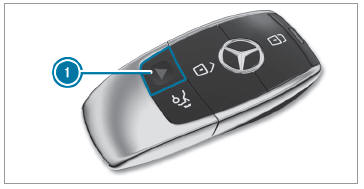
 To activate: press button
 for approximately one second.
