
Mercedes-Benz GLC 2016-2026 Owners Manual / MBUX multimedia system / Overview and operation / Functions of the Voice Control System
Mercedes-Benz GLC : Overview and operation / Functions of the Voice Control System
With the Voice Control System, various applications in the MBUX multimedia system are operable using voice input. The Voice Control System is operational approximately thirty seconds after the ignition is switched on and is available for the driver's seat and front passenger seat.
The following multimedia system applications can be operated:
- Navigation
- Telephone
- Media player
- Messages
- Vehicle functions
 Calling up applications using buttons
Calls up the telephone
Calls up navigation
Calls up radio or media
Calls up vehicle functions
Press briefly: calls up favourites
Press and hold: adds a favourite or theme or
creates a new theme
Alternatively, tap
on the touchscreen...

Other information:
Mercedes-Benz GLC 2016-2026 Owners Manual: Mercedes me calls
Making a call via the overhead control panel me button for service or information calls SOS button cover SOS button (emergency call system) Making a Mercedes me call Press me button . Making an emergency call To open the cover of SOS button , press it briefly...
Mercedes-Benz GLC 2016-2026 Owners Manual: Overview of climate control systems
Notes on climate control An interior air filter in combination with the prefilter in the engine compartment must always be used so that the air conditioning system, pollution level monitoring and the air filtration work correctly. Make sure that the filter is installed correctly and the filter housing in the engine compartment is closed correctly using the cap and always tightly sealed when in operation...
Categories
- Manuals Home
- Mercedes-Benz GLC Owners Manual
- Mercedes-Benz GLC Service Manual
- ATA (anti-theft alarm system)
- Overview of buttons on the steering wheel
- Overview of airbags
- New on site
- Most important about car
HANDS-FREE ACCESS function
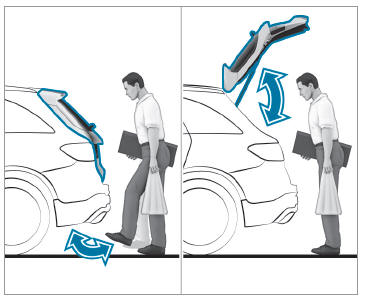
With HANDS-FREE ACCESS you can open, close or stop the closing process of the tailgate by performing a kicking movement under the rear bumper.
The kicking movement triggers the opening or closing process alternately.
Observe the notes when opening and closing the tailgate.

Copyright © 2026 www.meglc.net