
Mercedes-Benz GLC 2016-2026 Owners Manual / Wheels and tires / Tire labeling / DOT, Tire Identification Number (TIN)
Mercedes-Benz GLC : Tire labeling / DOT, Tire Identification Number (TIN)
US tire regulations stipulate that every tire manufacturer or retreader must imprint a TIN in or on the side wall of each tire produced.
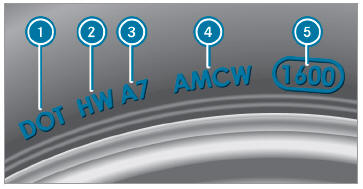
The data shown in the image is example data.
The TIN is a unique identification number to identify tires and comprises the following:
- DOT (Department of Transportation): tire
symbol marks
 indicating that
the tire
complies with the requirements of the US
Department of Transportation.
indicating that
the tire
complies with the requirements of the US
Department of Transportation. - Manufacturer identification code: manufacturer
identification code
 contains
details of the tire manufacturer. New tires
have a code with two symbols. Retreaded
tires have a code with four symbols. Further
information on retreaded tires.
contains
details of the tire manufacturer. New tires
have a code with two symbols. Retreaded
tires have a code with four symbols. Further
information on retreaded tires. - Tire size: identifier
 describes the tire
size.
describes the tire
size. - Tire type code: tire type code
 can be
used by the manufacturer as a code to
describe specific characteristics of the tire.
can be
used by the manufacturer as a code to
describe specific characteristics of the tire. - Manufacturing date: manufacturing date
 provides information about the
age of a
tire. The 1st and 2nd positions represent the
calendar week and the 3rd and 4th positions
state the year of manufacture (e.g. "3208"
represents the 32nd week of 2008).
provides information about the
age of a
tire. The 1st and 2nd positions represent the
calendar week and the 3rd and 4th positions
state the year of manufacture (e.g. "3208"
represents the 32nd week of 2008).
 Tire Quality Grading
In accordance with the US Department of Transportation's
"Uniform Tire Quality Grading Standards",
tire manufacturers are required to grade
their tires on the basis of the following three performance
factors:
Tread wear grade
Traction grade
Temperature grade
The data shown in the illustration is example
data...
 Information on the maximum tire load
The data shown in the image is example
data.
Maximum tire load is the
maximum permissible
weight for which the tire is approved.
Do not overload the tires by exceeding the specified
load limit...
Other information:
Mercedes-Benz GLC 2016-2026 Owners Manual: Personal data
Every vehicle is identified by a unique vehicle identification number. Depending on the country, this vehicle identification number can be used by, for example, governmental authorities to determine the identity of the owner. There are other possibilities to use data collected from the vehicle to identify the owner or driver, such as the license plate number...
Mercedes-Benz GLC 2016-2026 Owners Manual: Information on profiles, themes, suggestions and favourites
For electrically adjustable seats observe the following notes. WARNING Risk of becoming trapped during adjustment of the driver's seat after calling up a driver profile Selecting a user profile may trigger an adjustment of the driver's seat to the position saved under the user profile...
Categories
- Manuals Home
- Mercedes-Benz GLC Owners Manual
- Mercedes-Benz GLC Service Manual
- Information on collision detection on a parked vehicle
- Folding the rear seat backrest forwards
- Overview of the traffic light data service
- New on site
- Most important about car
Unlocking/opening the doors from the inside
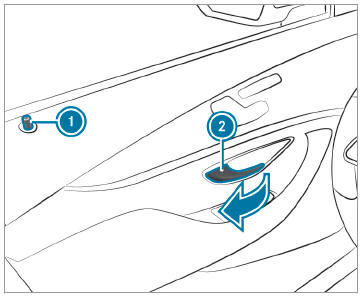
 To unlock and open a front
door: pull door
handle
To unlock and open a front
door: pull door
handle  .
.

Copyright © 2026 www.meglc.net