
Mercedes-Benz GLC : Data processing in the vehicle / Convenience and infotainment functions
You can store convenience settings and individual settings in the vehicle and change or reset them at any time.
Depending on the vehicle equipment, this includes the following settings, for example:
- Seat and steering wheel positions
- Suspension and climate control settings
- Individual settings, such as interior lighting
Depending on the selected equipment, you can import data into vehicle infotainment functions yourself.
Depending on the vehicle equipment, this includes the following data, for example:
- Multimedia data, such as music, films or photos for playback in an integrated multimedia system
- Address book data for use in connection with an integrated hands-free system or an integrated navigation system
- Entered navigation destinations
- Data about the use of Internet services
These data for convenience and infotainment functions may be saved locally in the vehicle or they may be located on a device which you have connected to the vehicle, such as a smartphone, USB flash drive or MP3 player. If you have entered these data yourself, you can delete them at any time.
This data is transmitted from the vehicle to third parties only at your request. This applies, in particular, when you use online services in accordance with the settings that you have selected.
 Operational data in the vehicle
This is data regarding the operation of the vehicle,
which have been processed by control units.
This includes the following data, for example:
Vehicle status information such as the speed,
longitudinal acceleration, lateral acceleration,
number of wheel revolutions or the fastened
seat belts display
Ambient conditions, such as temperature,
rain sensor or distance sensor
Generally, the use of these data is temporary;
they will not be stored beyond the period of
operation and will only be processed within the
vehicle itself...
 Smartphone integration (e.g. Android Auto or Apple CarPlay)
If your vehicle is accordingly equipped, you can
connect your smartphone or another mobile end
device to the vehicle. You can then control them
by means of the control elements integrated in
the vehicle...
Other information:
Mercedes-Benz GLC 2016-2026 Owners Manual: Configuring profiles, themes and suggestions
Multimedia system: Profiles Creating a new profile Select Create Profile . Select an avatar. Enter the name and confirm with . Select Continue . Select Current Settings. Select Save. Activate Bluetooth® and select Connect Phone, to connect a mobile phone with the user profile ...
Mercedes-Benz GLC 2016-2026 Owners Manual: Overview of the symbols and functions in the radio menu
Additional functions of TuneIn radio A relatively large volume of data can be transmitted when using TuneIn Radio. Additional functions of the satellite radio SIRIUS XM® satellite radio offers more than 175 digital-quality radio channels providing 100% commercial-free music, sports, news and entertainment, for example...
Categories
- Manuals Home
- Mercedes-Benz GLC Owners Manual
- Mercedes-Benz GLC Service Manual
- Sound settings
- AIR BODY CONTROL function
- Information on vehicle sensors and cameras
- New on site
- Most important about car
Activating or deactivating the child safety lock for the rear side windows
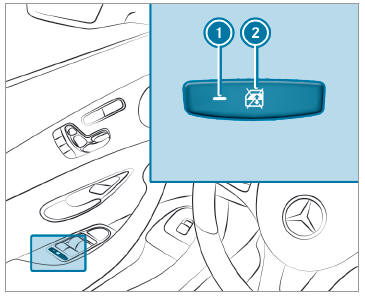
 To activate/deactivate: press button
 . The rear side window can be opened or closed in the following cases:
 is lit: via the switch on the driver's door
Indicator lamp
is lit: via the switch on the driver's door
Indicator lamp  is off: via the switch on the corresponding rear door or driver's door
