
Mercedes-Benz GLC 2016-2026 Owners Manual / Seats and stowing / Stowage areas / Cargo compartment cover
Mercedes-Benz GLC : Stowage areas / Cargo compartment cover
- Extending/retracting the cargo compartment cover
- Installing and removing the cargo compartment cover
- Removing the cargo compartment cover
- Installing the cargo compartment cover
 Adjusting the angle of the rear seat backrests (cargo position)
To enlarge the cargo compartment, you can
adjust the seat backrests so that they are ten
degrees steeper (cargo position).
Fold the seat backrest
forwards...
 Extending/retracting the cargo compartment cover
WARNING Risk of injury or death due to
poorly secured objects
The cargo compartment cover alone cannot
secure or restrain heavy objects, items of
luggage or heavy loads...
Other information:
Mercedes-Benz GLC 2016-2026 Owners Manual: Notes on MOExtended tires (run-flat tires)
WARNING Risk of accident when driving in limp-home mode When driving in emergency mode the handling characteristics are impaired. Do not exceed the specified maximum speed of the MOExtended tires. Avoid any abrupt steering and driving maneuvers as well as driving over obstacles (curbs, pot holes, off-road)...
Mercedes-Benz GLC 2016-2026 Owners Manual: Calling up the consumption indicator
M..
Categories
- Manuals Home
- Mercedes-Benz GLC Owners Manual
- Mercedes-Benz GLC Service Manual
- Overview of the traffic light data service
- Opening and closing the hood
- Sound settings
- New on site
- Most important about car
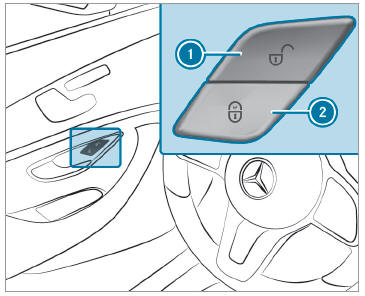
Activating/deactivating the automatic locking feature
The vehicle is locked automatically when the ignition is switched on and the wheels are turning faster than walking pace.

Copyright © 2026 www.meglc.net