
Mercedes-Benz GLC 2016-2026 Owners Manual / Opening and closing / SmartKey / Activating/deactivating the acoustic locking verification signal
Mercedes-Benz GLC : SmartKey / Activating/deactivating the acoustic locking verification signal
Multimedia system:


 Settings
 Vehicle
 Activate or deactivate Acoustic Lock.
 Overview of SmartKey functions
WARNING Risk of accident and injury
due to children left unattended in the
vehicle
If children are left unsupervised in the vehicle,
they could, in particular:
open doors, thereby endangering other
persons or road users...
 Activating/deactivating the panic alarm
Requirements:
The ignition is switched off.
To activate: press button
for approximately one second.
A visual and audible alarm is triggered.
To deactivate: briefly press button
again...
Other information:
Mercedes-Benz GLC 2016-2026 Owners Manual: Changing the unlocking settings
Possible unlocking functions of the SmartKey: Central unlocking Unlocking the driver's door and fuel filler flap To switch between settings: press the and buttons simultaneously for approximately six seconds until the indicator lamp flashes twice...
Mercedes-Benz GLC 2016-2026 Owners Manual: Vehicle towing instructions
The vehicle is not suitable for the use of tow bar systems that are used for flat towing or dinghy towing, for example. Attaching and using tow bar systems can lead to damage on the vehicle. When you are towing a vehicle with tow bar systems, safe driving characteristics cannot be guaranteed for the towing vehicle or the towed vehicle...
Categories
- Manuals Home
- Mercedes-Benz GLC Owners Manual
- Mercedes-Benz GLC Service Manual
- Digital Operator's Manual
- Replacing the rear window wiper blade
- ATA (anti-theft alarm system)
- New on site
- Most important about car
Activating or deactivating the child safety lock for the rear side windows
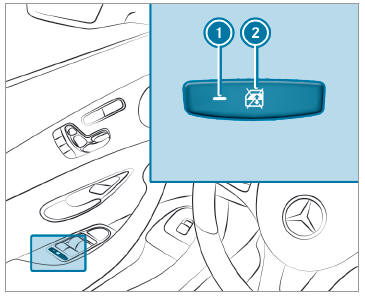
 To activate/deactivate: press button
 . The rear side window can be opened or closed in the following cases:
 is lit: via the switch on the driver's door
Indicator lamp
is lit: via the switch on the driver's door
Indicator lamp  is off: via the switch on the corresponding rear door or driver's door

Copyright © 2026 www.meglc.net