
Mercedes-Benz GLC 2016-2026 Owners Manual / Opening and closing / Doors / Locking/unlocking the driver's door with the emergency key
Mercedes-Benz GLC : Doors / Locking/unlocking the driver's door with the emergency key
If you wish to lock the vehicle entirely using the emergency key, first press the button for locking from the inside while the driver's door is open. Then proceed to lock the driver's door using the emergency key.
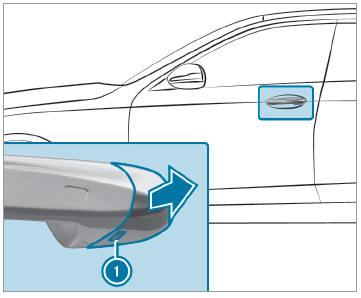
 Remove the emergency key.
 Insert the emergency key as far
as it will go
into opening
Insert the emergency key as far
as it will go
into opening  in the cover.
 Pull and hold the door handle.
 Pull the cover on the emergency
key as
straight as possible away from the vehicle
until it releases.
Pull the cover on the emergency
key as
straight as possible away from the vehicle
until it releases.
 Release the door handle.
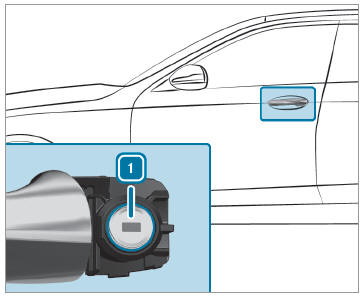
 To unlock: turn the
emergency key counterclockwise
to position
To unlock: turn the
emergency key counterclockwise
to position  .
.
 To lock: turn the
emergency key clockwise to
position
To lock: turn the
emergency key clockwise to
position  .
.
 Carefully press the cover onto
the lock cylinder
until it engages and is seated firmly.
Carefully press the cover onto
the lock cylinder
until it engages and is seated firmly.
 Activating/deactivating the automatic locking feature
The vehicle is locked automatically when the
ignition is switched on and the wheels are turning
faster than walking pace.
To activate: press and
hold button for
approximately five seconds until an acoustic
signal sounds...

Other information:
Mercedes-Benz GLC 2016-2026 Owners Manual: Notes on the MBUX multimedia system
WARNING Risk of distraction from information systems and communications equipment If you operate information and communication equipment integrated in the vehicle when driving, you will be distracted from the traffic situation. This could also cause you to lose control of the vehicle...
Mercedes-Benz GLC 2016-2026 Owners Manual: Using services
Requirements: There is an Internet connection. Mercedes me connect is available. You have set up a user account in the Mercedes me Portal. The vehicle is connected to a user account and you have accepted the conditions of use for the service...
Categories
- Manuals Home
- Mercedes-Benz GLC Owners Manual
- Mercedes-Benz GLC Service Manual
- Removing the cargo compartment cover
- Information on collision detection on a parked vehicle
- Opening the camera cover of the rear view camera
- New on site
- Most important about car
Overview of airbags
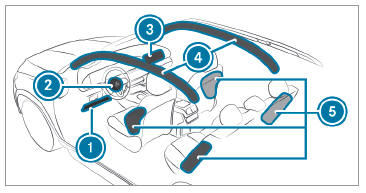
 Driver's knee airbag
 Driver's airbag

Copyright © 2026 www.meglc.net