
Mercedes-Benz GLC 2016-2026 Owners Manual / At a glance
Mercedes-Benz GLC : At a glance
- Cockpit
- Indicator and warning lamps (standard)
- Indicator and warning lamps (widescreen cockpit)
- Overhead control panel
- Door control panel and seat adjustment
- Emergencies and breakdowns
 Symbols
In this Operator's Manual, you will find the following
symbols:
DANGER
Danger due to not observing the warning notices
Warning notices draw your attention to hazards
that may endanger your health or life, or
the health or life of others...
 Cockpit
..
Other information:
Mercedes-Benz GLC 2016-2026 Owners Manual: Gearshift recommendation
T..
Mercedes-Benz GLC 2016-2026 Owners Manual: Notes on care of the interior
WARNING Risk of injury from plastic parts breaking off after the use of solvent- based care products Care and cleaning products containing solvents can cause surfaces in the cockpit to become porous. When the airbags are deployed, plastic parts may break away...
Categories
- Manuals Home
- Mercedes-Benz GLC Owners Manual
- Mercedes-Benz GLC Service Manual
- Folding the rear seat backrest forwards
- Sound settings
- Function of the interior motion sensor
- New on site
- Most important about car
Activating or deactivating the child safety lock for the rear side windows
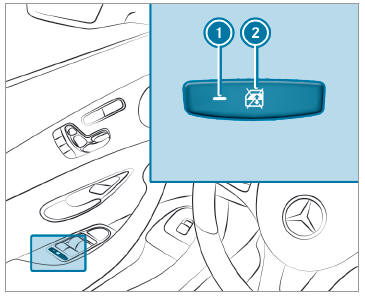
 To activate/deactivate: press button
 . The rear side window can be opened or closed in the following cases:
 is lit: via the switch on the driver's door
Indicator lamp
is lit: via the switch on the driver's door
Indicator lamp  is off: via the switch on the corresponding rear door or driver's door

Copyright © 2026 www.meglc.net