
Mercedes-Benz GLC 2016-2026 Owners Manual / Opening and closing / Doors / Locking/unlocking the vehicle with KEYLESS-GO
Mercedes-Benz GLC : Doors / Locking/unlocking the vehicle with KEYLESS-GO
Requirements:
- The SmartKey is outside the vehicle.
- The distance between the SmartKey and the vehicle does not exceed 3 ft (1 m).
- The driver's door and the door at which the door handle is used are closed.
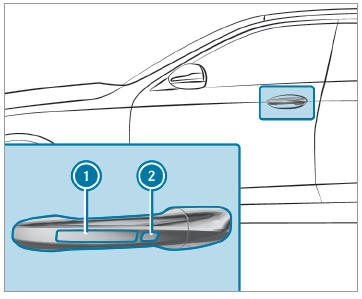
 To unlock the vehicle:
touch the inner surface
of the door handle.
To unlock the vehicle:
touch the inner surface
of the door handle.
 To lock the vehicle:
touch sensor surface
To lock the vehicle:
touch sensor surface
 or
or
 .
.
 Convenience closing:
touch recessed sensor
surface
Convenience closing:
touch recessed sensor
surface  until the closing process
has
been completed.
until the closing process
has
been completed.
Further information on convenience closing.
If you open the tailgate from outside, it is automatically unlocked.
 Centrally locking and unlocking the vehicle from the inside
To unlock: press button
.
To lock: press button
.
This does not lock or unlock the fuel filler flap.
The vehicle is not unlocked:
If you have locked the vehicle using the
SmartKey...
 Problems with KEYLESS-GO, troubleshooting
You can no longer lock or unlock the vehicle
using KEYLESS-GO
Possible causes:
The SmartKey functions have been deactivated.
The SmartKey battery is weak or discharged...
Other information:
Mercedes-Benz GLC 2016-2026 Owners Manual: Operating Active Distance Assist DISTRONIC
Requirements: The electric parking brake is released. ESP® is activated and is not intervening. The transmission is in position . The driver's door is closed. Check of the radar sensor system has been successfully completed. Parking Assist PARKTRONIC is not being used to park the vehicle or to exit from a parking space...
Mercedes-Benz GLC 2016-2026 Owners Manual: Operating the on-board computer
Observe the legal requirements for the country in which you are currently driving when operating the on-board computer. The on-board computer is operated using the left-hand Touch Control and the left-hand back/ home button. When the on-board computer is being operated, different acoustic signals will sound as operating feedback, e...
Categories
- Manuals Home
- Mercedes-Benz GLC Owners Manual
- Mercedes-Benz GLC Service Manual
- Activating or deactivating the child safety lock for the rear doors
- Using the 12 V socket
- Opening and closing the sliding sunroof
- New on site
- Most important about car
Activating or deactivating the child safety lock for the rear side windows
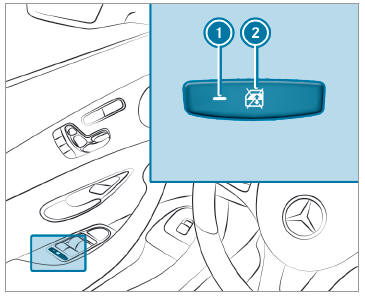
 To activate/deactivate: press button
 . The rear side window can be opened or closed in the following cases:
 is lit: via the switch on the driver's door
Indicator lamp
is lit: via the switch on the driver's door
Indicator lamp  is off: via the switch on the corresponding rear door or driver's door

Copyright © 2026 www.meglc.net